Rea Video
Rea Video remake: from a shot list to your own video
Rea Video is an open-source tool by JuneYaooo that breaks a video into shots and says whether each was filmed, generated by AI or built in code. It renders nothing itself. This page shows the reports and remakes the project has published, with a studio at the top to make your own version: from your clip as a motion reference, a still as the first frame, or a prompt alone.
Start your remake- reference to video
- image to video
- text to video
- price shown before you generate
Updated
Your video
Photos (optional)
A photo of who goes in, or of the clothes, product or place your note names. Up to 9.
What to change (optional)
Anything you do not mention stays as in your video. How closely the result follows a note depends on the model.
Clone Cut AI in action
Wan 3.0
Same moves, a new person
Photos
0 / 9One photo starts the clip. With two or more, the model takes the people and things from them. Up to 9 photos, JPG, PNG or WebP.
0 / 20,000
Model
Why we ask
Putting a real person into a video without their OK can break privacy and image-rights laws, and that responsibility is yours. We keep the time you confirmed with the request.
Real examples
Wan 3.0
What is Rea Video?
Rea Video, rea-video on GitHub, is a free video breakdown tool published by JuneYaooo under the Apache 2.0 licence. The repository was created on 29 October 2026 and had passed 5,000 stars by 10 November 2026. You give it a reference video; it cuts the clip into shots, collects evidence for each shot and writes a report that says how every part was most likely made and how to make it again.
Rea Video runs on your own computer, as a Python command-line tool or as a skill inside an AI coding agent such as Claude Code or Codex, and needs ffmpeg and Python 3.10 or later. It measures before it guesses: frame-rate patterns, duplicate frames, sensor noise, text on screen, the tempo of the music. A vision model is optional and settles the shots the measurements cannot.
What Rea Video does not do is make the new video. Its remakes come from a companion project, capsule-cinema, which generates the AI shots and puts them back on the original timeline; the filmed shots are left for you to shoot and the coded ones to rebuild. Making new footage is what the studio at the top of this page is for, in a browser tab on Capafy AI.
| Item | Rea Video |
|---|---|
| Licence | Apache 2.0, free |
| Author | JuneYaooo |
| Runs on | Your computer: a command line, or a skill in Claude Code or Codex |
| Needs | ffmpeg and Python 3.10 or later |
| Reads | Shots and cuts, the production method of each shot from 11 kinds, captions, voice, music and effects |
| Writes | An HTML report, a JSON file, first and last frames of each shot, prompts and subtitle files |
| Remake | Through capsule-cinema for the AI shots; filmed and coded shots by you |
| Where | The GitHub repository JuneYaooo/rea-video and the project's site, reavideo.ai |
The four steps behind a Rea Video report
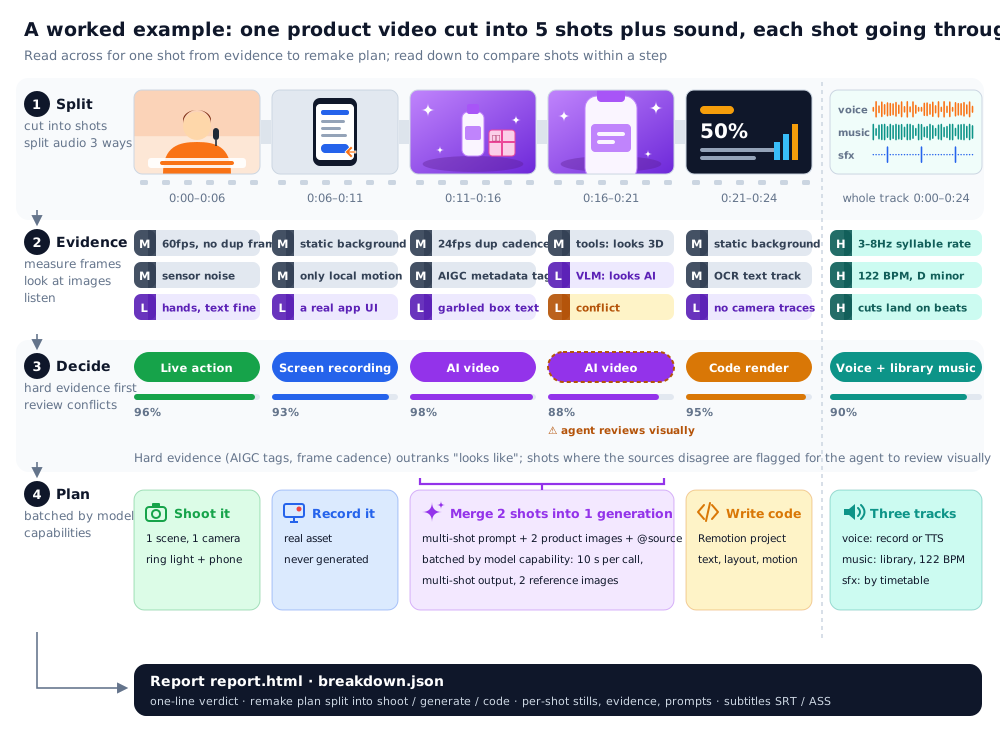
The diagram is the project's own worked example: a product video cut into five shots plus sound, each going through the same four steps before the report is written.
Split
The clip is cut at every change of shot, and the sound is split three ways: voice, music and effects.
Evidence
Each shot is measured and looked at: frame rate, repeated frames, noise, text and, with a vision model on, what the picture shows.
Decide
Hard evidence such as an AI metadata tag or a frame cadence outranks how a shot looks; shots where the sources disagree are flagged for review.
Plan
The remake is grouped by what the target model can do: what to film, what to generate and in how many calls, what to build in code.
Rea Video sample reports
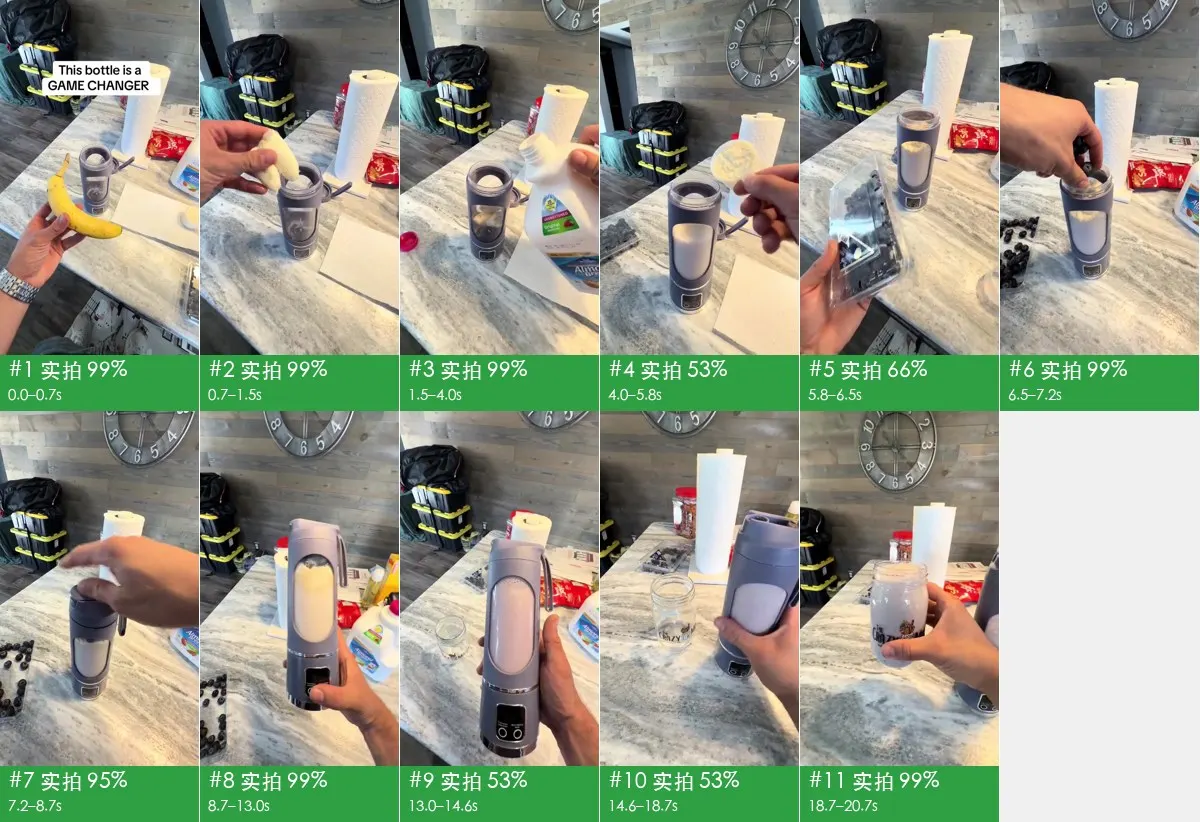
The repository publishes the reports Rea Video wrote for real videos. Each card shows the storyboard and audio timeline as the tool draws them, with the verdict in numbers from the top of the report.
A blender ad shot on a phone
A first-person tabletop ad from TikTok: a hand, a banana and a portable blender cup on a kitchen counter. Rea Video calls every shot live footage and plans the remake as one set with two camera setups.
- 20.7 s, 9:16
- 11 shots
- Filmed 100%

A TikTok ad; the repository does not name its maker.
Rea Video report: A blender ad shot on a phone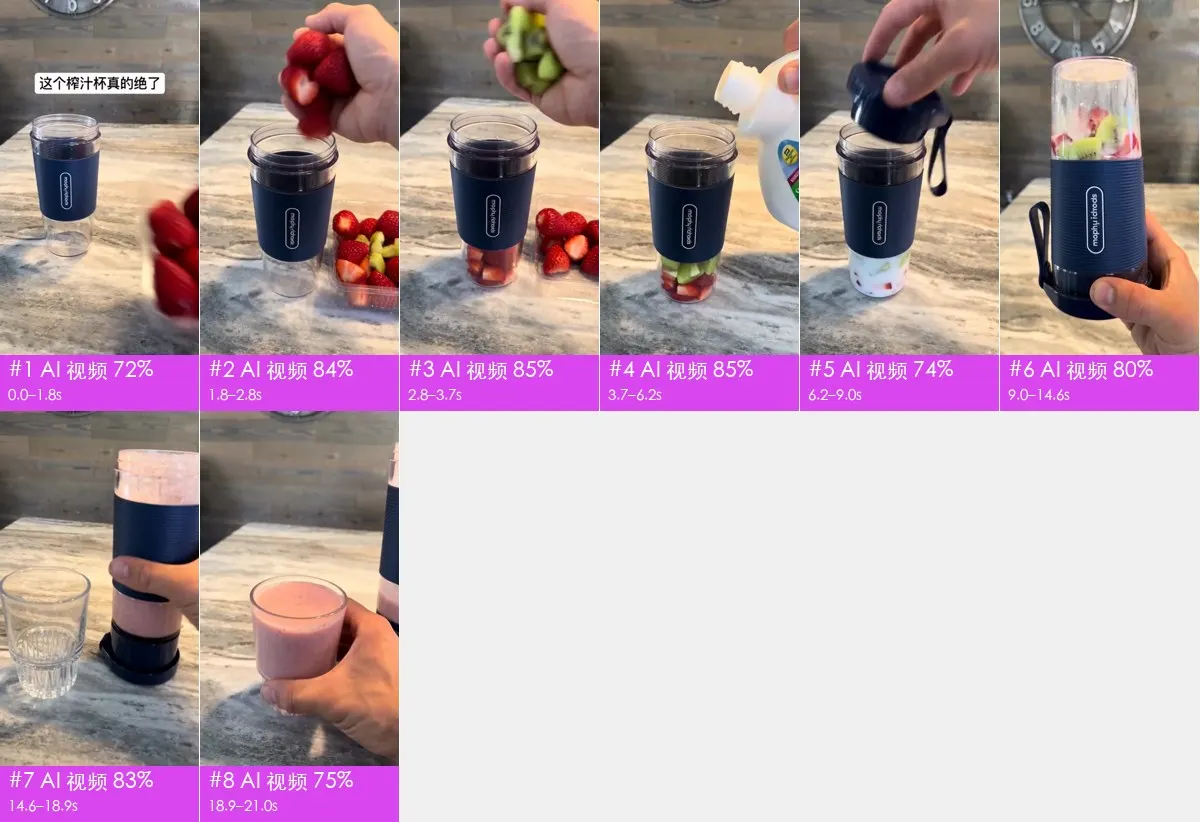
Its AI remake with another product
The same ad made again with AI and a different blender, keeping its set, camera angles and jump cuts. Rea Video judges all of it AI video, groups the 8 shots into 3 generations, and asks for product reference images for two shots and a logo for one.
- 21.0 s, 9:16
- 8 shots
- AI video 100%

Made by OiiOii from the TikTok original, as the repository describes it.
Rea Video report: Its AI remake with another product
Two AI characters, cut with screens
Two AI-generated characters talk in a living room, and five interface shots built in code sit between their lines, with 8.2 seconds of real screen recording inside. The plan is one generation for the 5 dialogue shots and one code project for the rest.
- 19.0 s, 9:16
- 10 shots
- Code or template 59%, AI video 41%

The repository does not name its maker.
Rea Video report: Two AI characters, cut with screens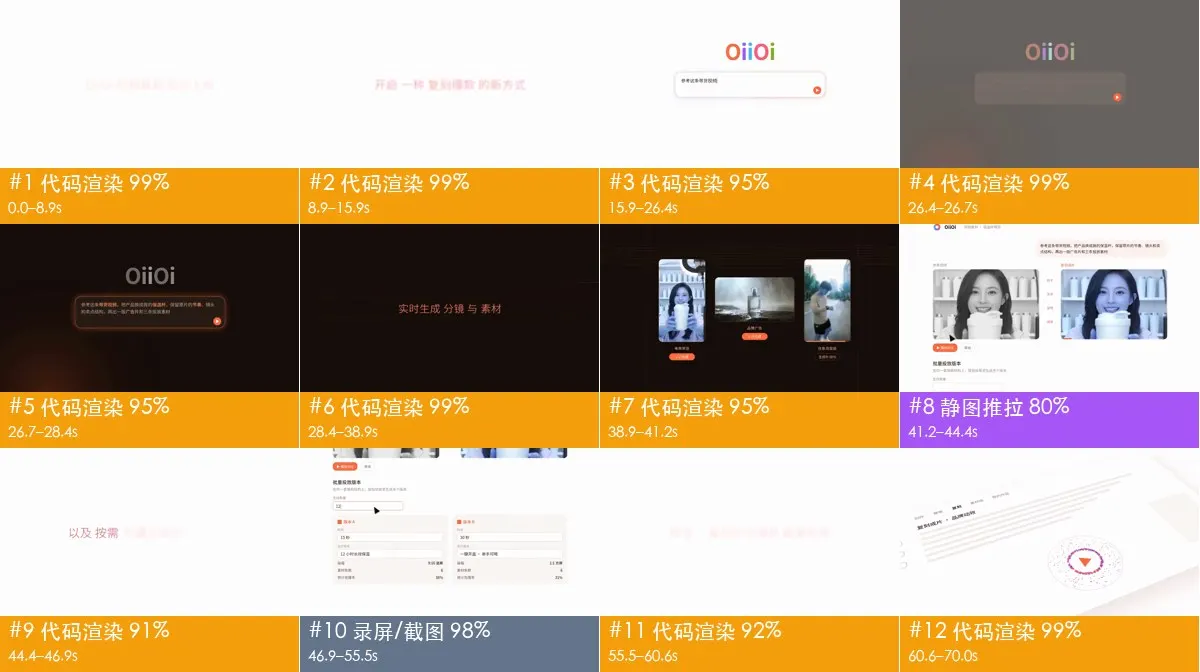
A software promo made of motion graphics
A 70-second horizontal promo made mostly of animated interface panels, with real screens inside them and seven dissolves between shots. The plan rebuilds most of it in code instead of generating it.
- 70.0 s, 16:9
- 12 shots
- Code or template 83%, screen recording 12%, still with a pan 5%

OiiOii's promo for its video remake feature, as the repository describes it.
Rea Video report: A software promo made of motion graphics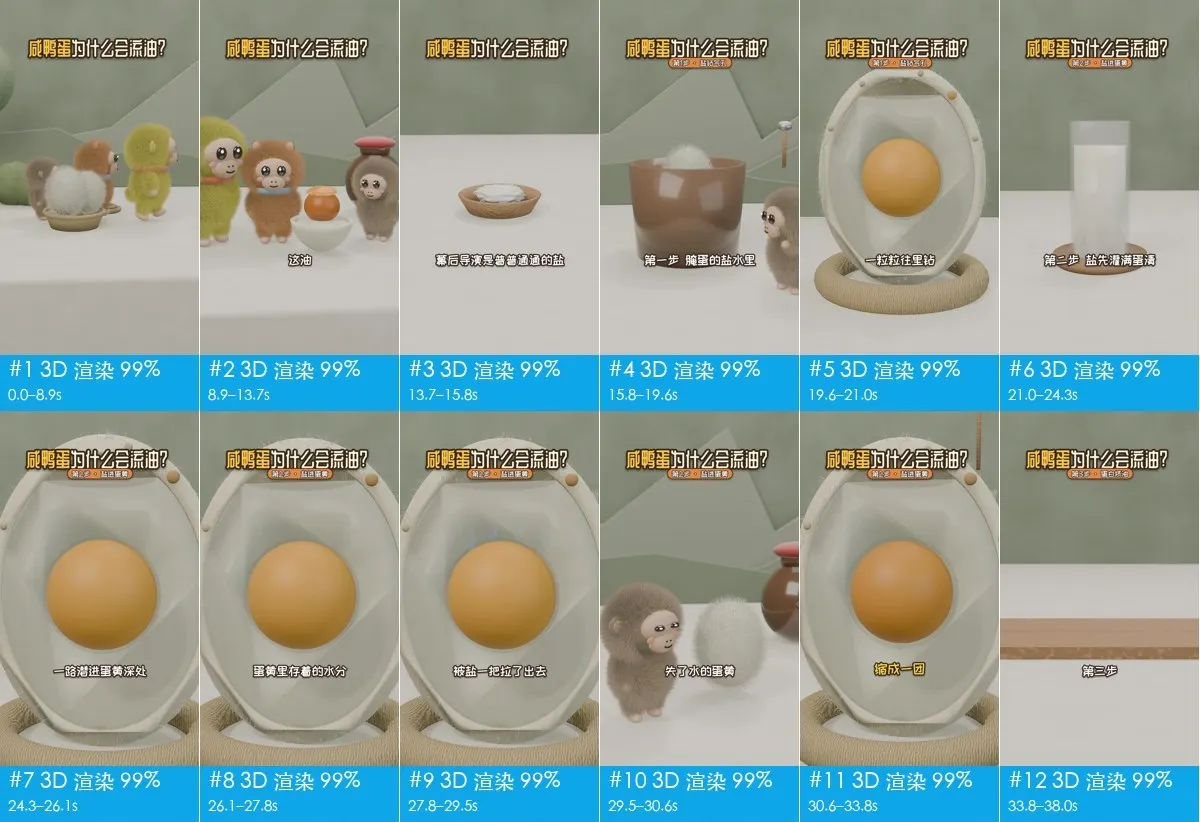
A 3D explainer about salted eggs
Furry 3D characters explain why the yolk of a salted duck egg turns oily. Every one of the 21 shots is judged a 3D render, the plan turns them into 10 generations, and the sound is a voice, library music at 110 BPM and five effects.
- 66.5 s, 9:16
- 21 shots
- 3D render 100%

The repository does not name its maker.
Rea Video report: A 3D explainer about salted eggs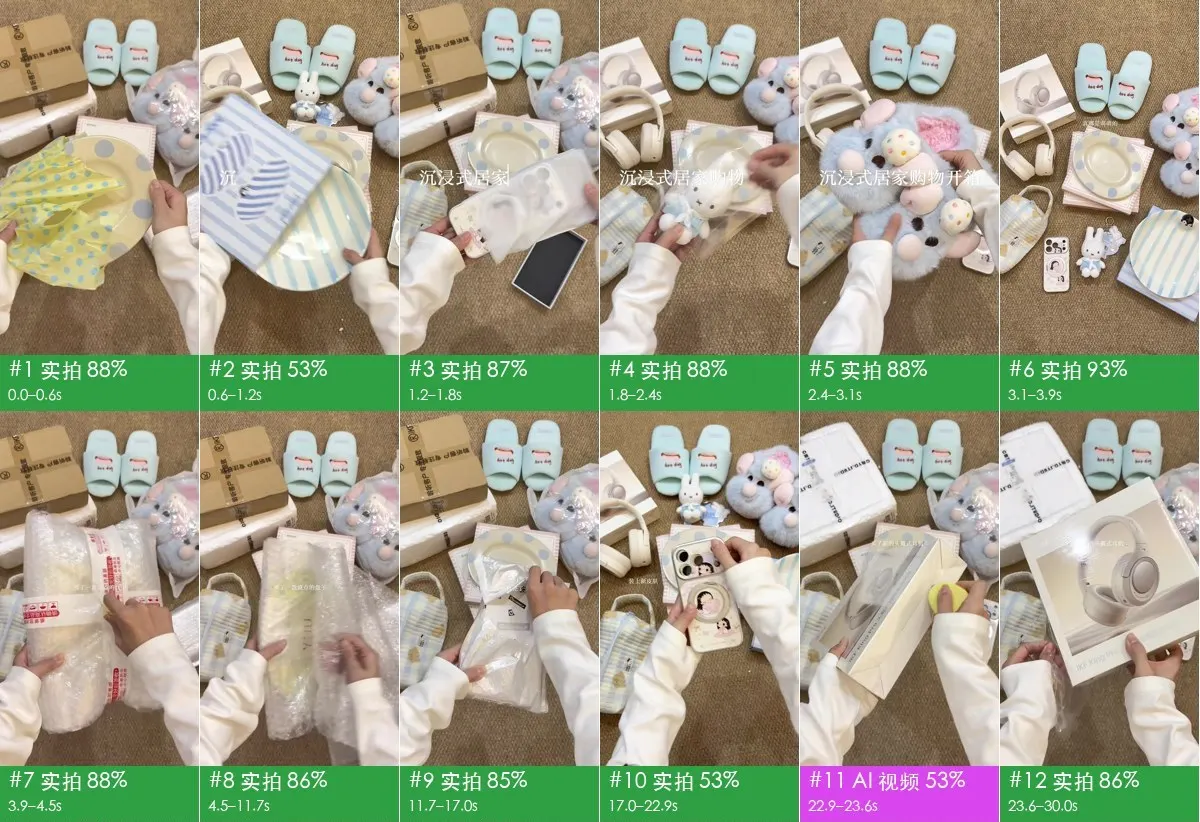
Unboxing on a rug, filmed from above
A phone fixed above a rug and two hands opening pastel slippers and plush toys. Almost all of it is live footage; Rea Video leaves two short shots as AI, marked unconfirmed, and plans one set with two camera setups for the 27 filmed ones.
- 71.5 s, 9:16
- 29 shots
- Filmed 97%, AI video 3%

By the Douyin creator 阿咪🍓, as the repository credits it.
Rea Video report: Unboxing on a rug, filmed from above
Storyboards and audio timelines: from the rea-video repository by JuneYaooo, whose own work is under the Apache License 2.0; the labels are in Chinese, as the reports were written. The stills inside them are frames of the analysed videos and stay their makers', named on each card as the repository names them.
Remakes from Rea Video reports
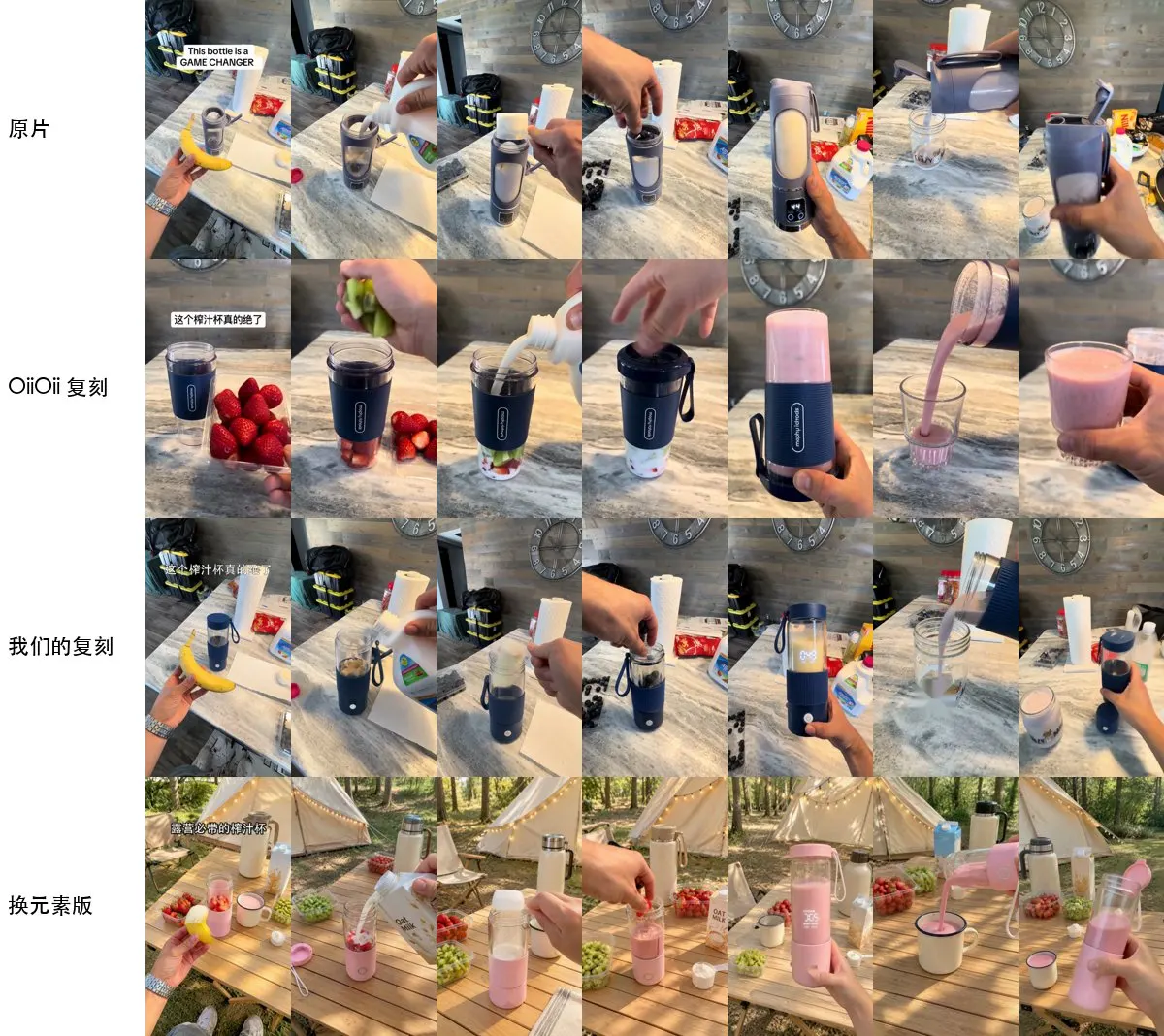
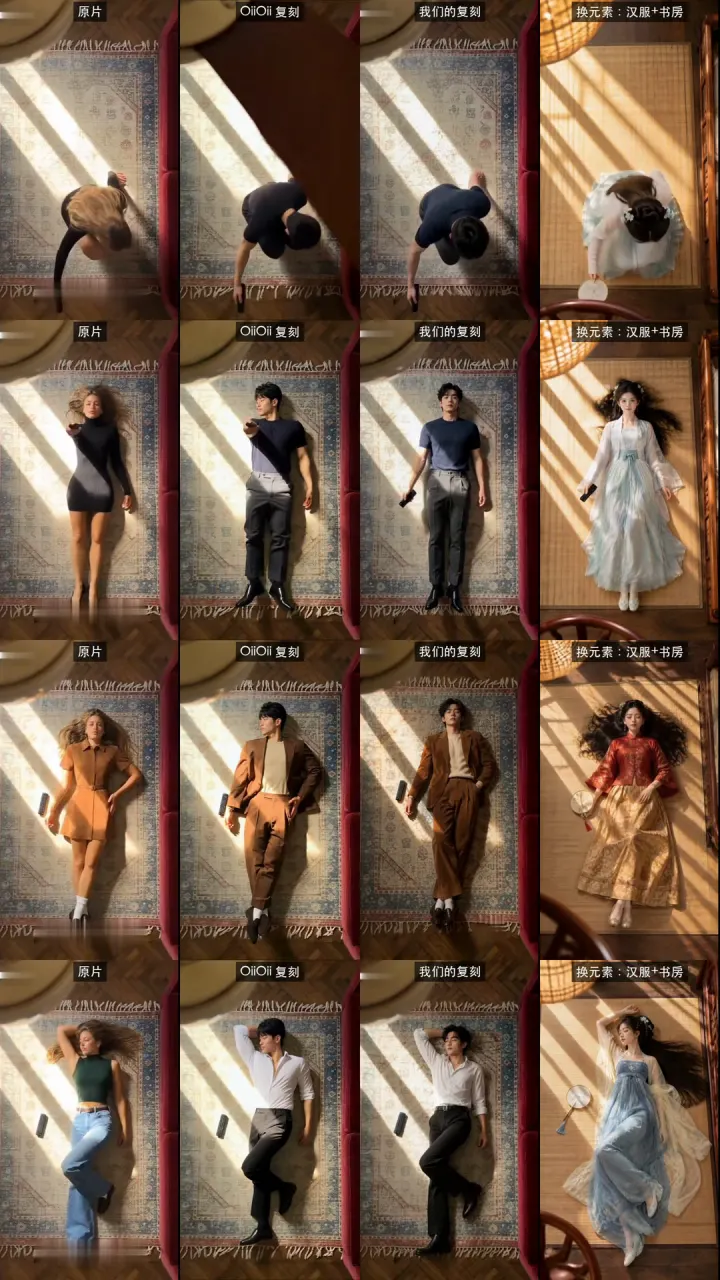
The project's README shows three remakes made from its reports. Each sheet lines up the same moments in four versions, so you can see what a remake keeps, the camera, the motion and the pacing, and what it changes: the person, the product or the place.
The blender ad, with a new product
The tabletop ad from the reports, moment by moment, down to a version that moves it to a campsite with a pink blender.
New clothes on every cut
A person lying on a rug changes outfit with each cut; the swap version moves the scene to a study, in a hanfu dress on a bamboo mat.
A clay figure in drawn paper scenes
A small clay character walks through drawn scenes; the swap version becomes a fox under the northern lights and a coral reef.
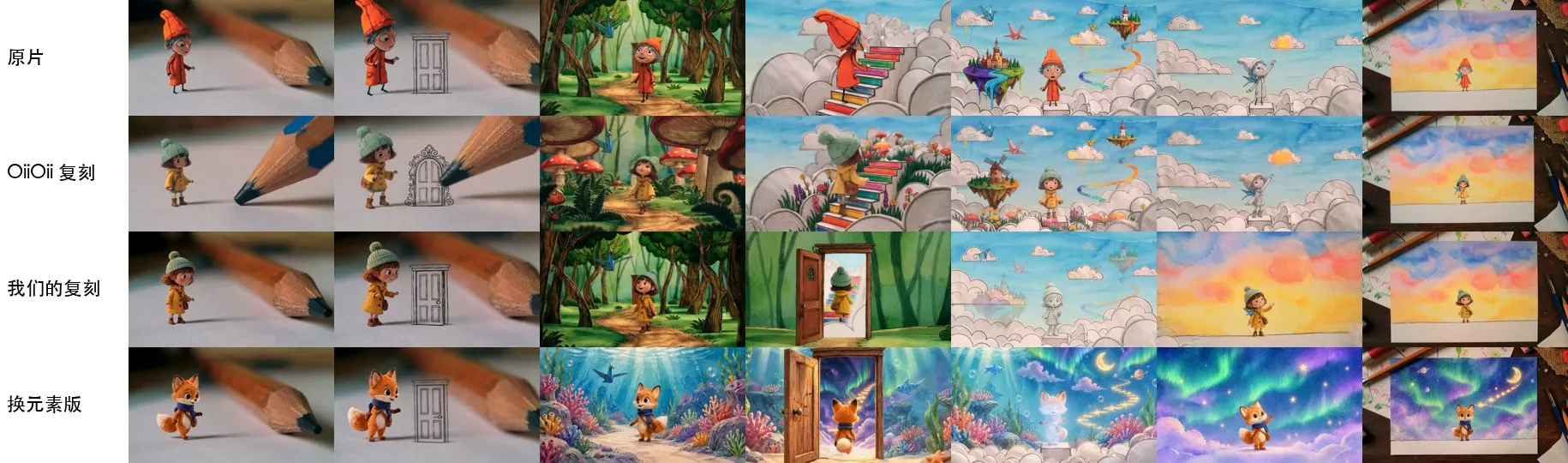
Comparison sheets: from the rea-video repository by JuneYaooo. The four versions are the original, OiiOii's remake, the project's remake, and one that also swaps the subject, setting and props; the project made its two with a self-hosted MiniMax H3, the original shot as the motion reference and keyframes from gpt-image-2. The originals and OiiOii's versions come from OiiOii's WeChat articles and are shown by the project for comparison only; they are not under its licence and their makers are not named.
Remake a Rea Video report on Capafy AI
A Rea Video report tells you what to make. The studio at the top of this page makes the part a video model can do, in your browser, with nothing to install. Pick the tab that matches each part of the plan:
| In the Rea Video plan | Tab to use here | What you give it |
|---|---|---|
| AI shots where the motion matters | Reference to video | Your own clip of 2 to 30 s, up to 50 MB, as the motion reference; up to 9 photos and a note of up to 18,000 characters on Wan 3.0 (fewer on the other models) on what to change |
| A shot's first frame from the report | Image to video | 1 to 9 images: one is the first frame, several are references for the people and objects; a prompt for the motion |
| A prompt from the report | Text to video | The prompt (up to 20,000 characters on Wan 3.0), with the subject changed to yours |
| Filmed, screen-recorded or coded shots | None of them | Film it, record the screen or build it in an editor, as the report describes |
Reference to video runs on Wan 3.0, Seedance 2.5, Seedance 2.0, Kling 3.0 and MiniMax H3; image and text to video on Seedance 2.5, Seedance 2.0, Kling 3.0, Wan 3.0 and MiniMax H3, 2 to 30 seconds. The price in credits is on the button before you generate: a 5-second reference clip on Wan 3.0 at 480p is 8 credits, and image or text to video starts at 2. Credit packs start at $14.99 for 32 credits, paid once.
Rea Video's own remakes are generated a shot or a group of shots at a time and put back on the original timeline. Here, reference to video takes the whole clip in one go: it keeps the original sound, and the model follows the clip's timing and cuts as closely as it can, not frame for frame. For a long video, trim the part you want first.
Rea Video and this page, side by side
| Compared | Rea Video (open source) | This page on Capafy AI |
|---|---|---|
| What it is | A breakdown tool that reads a video and writes a report | A studio that makes a new video from a clip, a still or a prompt |
| Where it runs | Your computer, from a terminal or an AI coding agent | A browser tab |
| Setup | ffmpeg, Python 3.10 or later, the repository | A Google sign-in |
| Breaks your video down shot by shot | Yes, with measurements and an optional vision model | No; for prompts from a clip, use video to prompt |
| Makes the new video | Through capsule-cinema, with the model services you connect | Here, with credits: reference, image or text to video |
| Cost | Free software; you pay the model services you use | Credits per video, the price shown first |
Capafy AI is an independent AI video studio. It is not the Rea Video project, runs none of its code and is not endorsed by its author or by OiiOii; the name is used to say what this page is about.
No Rea Video install? Get the prompts in a browser
Rea Video needs a terminal and a few installs. If all you want is the prompts for a short clip, the video to prompt tool on Capafy AI reads an MP4 or MOV of 2 to 30 seconds for free, 20 a day, and writes one prompt for the whole clip and one for every shot, with the same generator under it. It asks a vision model and measures nothing, so you get prompts and a shot list, not Rea Video's evidence.
Getting a good remake from a Rea Video report
- Start from the clean export of your clip, not a re-download; both Rea Video and the models see more detail
- Generate the AI shots and film the live ones, as the plan splits them
- Use your own product photos where the plan asks for reference images
- Keep captions and stickers out of the prompt and add them in an editor
- Remaking someone's face without their consent, including your own clip of other people
- Expecting a prompt alone to repeat the motion; reference to video follows it more closely
- Sending more than the model takes; trim the clip to the shots you need
- Treating a verdict as proof of how a video was made
What to keep in mind
- This page does not run Rea Video, break your video down or judge how it was made; the reports and remakes shown are the project's, from its repository.
- A Rea Video verdict weighs measurements and, when on, a vision model; some reports mark shots as unconfirmed or for review.
- Reference to video takes 2 to 30 seconds and up to 50 MB; trim a longer video first.
- A generated clip is new footage: timing, faces and lettering can differ from the original.
Remake with consent
Remake videos you made or have permission to use. A Rea Video report is for learning how a format works: the footage, music, characters and faces in someone else's video stay theirs. Put in only people who agreed to it, no children and no public figures, and switch on the AI label where the platform has one. Your uploads are deleted after 7 days, and anyone can ask for a result to come down on the takedown page.
Related pages
Prompts from your own clip in the browser: Video to prompt. Swapping the people in a video with your photos: Clone Cut AI. Length, ratio and resolution for each model: AI video models. Packs and what a video costs: Pricing.
FAQ
Questions and answers
What is Rea Video?
An open-source video breakdown tool by JuneYaooo, under the Apache 2.0 licence, created on 29 October 2026. It cuts a video into shots and writes a report on how each shot was most likely made, filmed, AI-generated or coded, with prompts and a remake plan. It runs on your computer.
Is this page the Rea Video project?
No. Capafy AI is an independent AI video studio and does not run Rea Video's code. The project lives in its GitHub repository, JuneYaooo/rea-video, and on its site, reavideo.ai. The images here are the project's, shown with credit.
What does Rea Video leave for me to do?
Making the video. Rea Video writes the report and the plan; its companion project, capsule-cinema, can generate the AI shots and put them back on the original timeline, and the filmed shots are yours to shoot. On this page, the studio at the top makes the new footage in a browser.
Is Rea Video free?
The software is free under Apache 2.0. If you connect a vision model or a video model, you pay that service. Generating here costs credits, from 2 for a short image or text to video clip; packs start at $14.99.
How do I use a Rea Video report on this page?
Open the report's remake plan. For an AI shot where the motion matters, put your clip in Reference to video; for a shot whose first frame the report saved, add it in Image to video; for a prompt, paste it into Text to video and change the subject. Film and code the rest as the plan says.
What does a remake cost here?
A 5-second reference clip on Wan 3.0 at 480p is 8 credits; image and text to video start at 2 credits. The exact price for your clip, model and length is on the button before you generate.
Can this page break down my video like Rea Video?
No. For prompts from your own clip, the video to prompt page on Capafy AI reads a video of 2 to 30 seconds in the browser and writes a prompt per shot. It uses a vision model only, without Rea Video's measurements.
Can I remake someone else's video?
Only with material you have the right to use and people who agreed to appear. Reports are for learning how a format works; the original footage, music and faces stay their owners'.