Video to prompt
Video to prompt: turn a short clip into prompts
Upload a video of 2 to 30 seconds and get it back as text: one prompt for the whole video and one for each shot, each naming the subject, the setting, the shot size, the camera move and the light. Copy them into any video model, or paste one into the generator under the tool.
Upload the video- one prompt per shot
- one for the whole video
- free to read
- MP4 or MOV, 2 to 30 s
Updated
Free
Your prompts
Add a video and its prompts appear here
MP4 or MOV, 2 to 30 seconds. Reading is free and needs a Google sign-in; no photos are needed.
- One prompt for the whole video
- One prompt for each shot, ready to copy
- Shot size, camera move and light spelled out
- On-screen text listed apart from the prompts
- Voice, music and effects, where the model can tell
- Everything in one Markdown file
Paste your prompt and generate
Text to video runs the prompt as it is; image to video adds a still as the first frame; reference to video keeps the motion of your own clip. Pick a model and a length, and the price in credits is on the button, from 2 credits.
Your video
Photos (optional)
A photo of who goes in, or of the clothes, product or place your note names. Up to 9.
What to change (optional)
Anything you do not mention stays as in your video. How closely the result follows a note depends on the model.
Clone Cut AI in action
Wan 3.0
Same moves, a new person
0 / 20,000
Model
Why we ask
Putting a real person into a video without their OK can break privacy and image-rights laws, and that responsibility is yours. We keep the time you confirmed with the request.
Real examples
Wan 3.0
What does video to prompt mean?
Video to prompt is the reverse of text to video: you give a tool a finished clip and it writes the prompt that could have produced it. People use it to learn why a clip looks the way it does, to reuse a look with a new subject, and to brief an AI video model without starting from a blank box.
The video to prompt tool on this page is part of Capafy AI. A vision model watches your clip (or stills from it, when the main model is busy), splits it at the cuts and writes one prompt per shot plus one for the whole video. Reading is free with a Google sign-in, 20 clips a day, and nothing is installed. The generator under the tool runs the prompts you copy.
How to turn a video into a prompt
Upload the video
Put an MP4 or MOV file of 2 to 30 seconds, up to 50 MB, in the box at the top and sign in with Google.
Copy the prompts
The prompt for the whole video comes first, then the shot list with its own prompt under each shot. Copy one, copy all, or download them as a Markdown file.
Generate from one
Paste one into the generator under the tool, or into any other text-to-video model. Change the subject line, keep the camera and light, and the price shows before you generate.
What goes into each prompt
A prompt that works names the things a video model can act on, in a steady order.
| Element | In the prompt | Example wording |
|---|---|---|
| Subject and action | Who or what is on screen and what happens, without naming real people | a woman in a denim jacket lifts a white mug and smiles |
| Setting | Where it takes place | at a bright kitchen counter |
| Shot size and angle | How close the camera is and from where | medium shot at eye level |
| Camera move | Static, handheld, a push-in, a pan | slow push-in |
| Light | Direction, softness and colour | soft warm window light from the left |
| Style | The overall look and the frame shape | realistic product ad, vertical 9:16 |
The example wording is an illustration of the format, not the output of a real upload. Captions, stickers and logos are left out of the prompts on purpose and listed separately as on-screen text, because video models draw lettering badly and an editor does it in seconds.
Video to prompt, the long way round
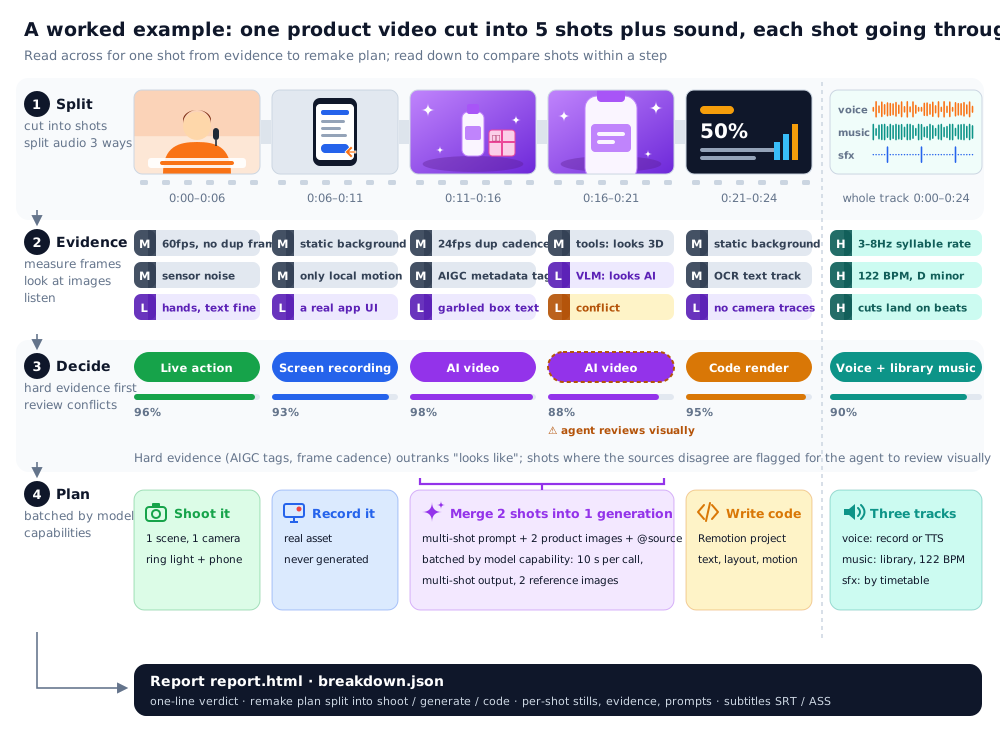
The figure is from the open-source Rea Video project, which runs on your own computer, not from this page. It shows how far a careful video to prompt job can go: cut the clip into shots, gather evidence for each one, decide how it was made, then plan the remake, with prompts for every shot a model can generate. This page skips the measuring and asks a vision model for the prompts directly; the Rea Video page shows the project's own sample reports.
A prompt alone, or the prompt with your video
A prompt carries the look of a shot, not its exact motion. Paste a video to prompt result into text to video and you get a new clip in the same spirit: similar framing and light, different timing and gestures. That is the right tool when you want variations.
When the motion is the point, a dance, a product turn, a camera move you want to keep, give the model the video as well. The generator's Reference to video tab is Capafy AI's Clone Cut in its reference mode: your clip is the reference, up to 9 photos stand in for the people, and a note of up to 18,000 characters on Wan 3.0 (fewer on the other models) says what else to change. A 5-second clip on Wan 3.0 at 480p is 8 credits.
| Compared | Prompt only | Prompt with the video as reference |
|---|---|---|
| What carries over | Subject, setting, framing, light, style | All of that, and the model follows the timing, camera moves and cuts as closely as it can |
| What changes | Motion and timing are new each time | Mainly what your photos and note ask for; details can still differ |
| Good for | Variations, mood boards, a different subject in the same look | Remaking a format that already works |
| Tab in the generator | Text to video, or image to video with a still, on Seedance 2.5, Seedance 2.0, Kling 3.0, Wan 3.0 and MiniMax H3 | Reference to video, on Wan 3.0, Seedance 2.5, Seedance 2.0, Kling 3.0 and MiniMax H3 |
Video to prompt at a glance
| Item | Detail |
|---|---|
| Video | MP4 or MOV, 2 to 30 seconds, up to 50 MB |
| Prompts | One for the whole video and one per shot, up to 24 shots |
| Also listed | Likely production method, camera, light, sound and on-screen text |
| Price | Free to read, 20 videos a day per account, counted together with Clone Cut's video reads; generating costs credits |
| Sign-in | Google account |
| Language | Prompts are written in English |
| Export | Copy buttons and a Markdown download |
| Your video | Deleted 7 days after upload |
What people do with a video to prompt result
Reuse a look
Keep the framing, light and style from a shot you like and swap the subject for your own product or character.
Learn prompt writing
See how a finished shot reads as text, then compare it with what you would have typed.
Brief a model shot by shot
Feed one prompt per shot instead of one long paragraph, and join the results in an editor.
Document a format
Save the Markdown with the timings, so a series keeps the same structure from episode to episode.
Translate a storyboard
Turn a rough cut filmed on a phone into prompts for the AI version of the same idea.
Check what is on screen
Get the captions and signs as written, with the seconds they show, apart from the prompts.
Better prompts from your video
- Pick a clip where each shot shows one clear action
- Use the original file; a re-recorded feed blurs the detail the prompt depends on
- Take the per-shot prompt for one shot, and the whole-video prompt for the full clip
- Edit the subject line and leave the camera and light lines alone to keep the look
- Expecting the same motion from a prompt alone
- Split screens and picture-in-picture, where two videos share the frame
- Pasting captions into the prompt; add them in an editor afterwards
- Uploading a video of someone who has not agreed to it
What a video to prompt result cannot do
- It is not the prompt the original maker typed. Most shared videos do not carry that prompt, and this tool does not read file metadata; what you get is a fresh description that aims at the same picture.
- The model is asked not to name real people and to describe how they look instead; brand names printed on screen go into the on-screen text, outside the prompts.
- It reads 2 to 30 seconds and at most 24 shots. Trim a longer video first.
- The production method next to each shot is a judgement by a vision model, not a measurement.
- Prompts come in English, whatever the language of the video.
Use it on videos you may study
Read videos you made or have permission to study. A prompt is for learning a look: the footage, music, characters and faces in someone else's video stay theirs. If you generate from it, put in only people who agreed to it, no children and no public figures, and switch on the AI label where the platform has one. Your video is deleted after 7 days, and anyone can ask for a result to come down on the takedown page.
Related pages
What the open-source Rea Video is, its sample reports and a generator for the remake: Rea Video. Remaking a clip with your photos: Clone Cut AI. Prompt length, ratio and resolution for each model: AI video models. Twelve ready-made aerial prompts: AI drone shot prompts.
FAQ
Questions and answers
How do I convert a video to a prompt?
Upload the video on this page (MP4 or MOV, 2 to 30 seconds), sign in with Google and wait while it is read. You get one prompt for the whole video and one for each shot, with copy buttons and a Markdown download.
Is this video to prompt tool free?
Reading a video and getting its prompts is free, for 20 videos a day per account (the same daily count as Clone Cut's video reads). Generating a new video in the generator under the tool costs credits, from 2 for a short clip.
Which AI video models can I use the prompts with?
Any text-to-video model, since the prompts are plain English. On Capafy AI, paste one into the generator under the tool: text or image to video, or reference to video with your clip; the comparison table above lists the models for each.
Will the prompt recreate my video exactly?
No. A prompt describes subject, setting, framing, camera and light; a model fills in the motion differently each time. To keep the motion, put the video in the generator's Reference to video tab as well.
Can it extract the original prompt from an AI video?
Not the one that was typed. Most videos shared online do not carry their prompt, and this tool does not read file metadata. What you get is a new prompt written from what is visible and audible, which is usually enough to reach a similar result.
How long can the video be, and which formats work?
2 to 30 seconds, as MP4 or MOV, up to 50 MB. No more than 24 shots are listed.
Can I paste a YouTube or TikTok link?
No. This page takes an uploaded file only (MP4 or MOV), so save the video to your device first, and use videos you made or may study.
Does it work for image to prompt as well?
This page reads video. A single still gives a prompt with no camera move or action, so for one picture describe it yourself or use the first shot of a short clip.
What happens to my video?
It is safety-checked, read by a vision model and deleted after 7 days. The prompts are kept without your name or file, so an identical upload is not read again.