Guides
How to put yourself in a video with AI
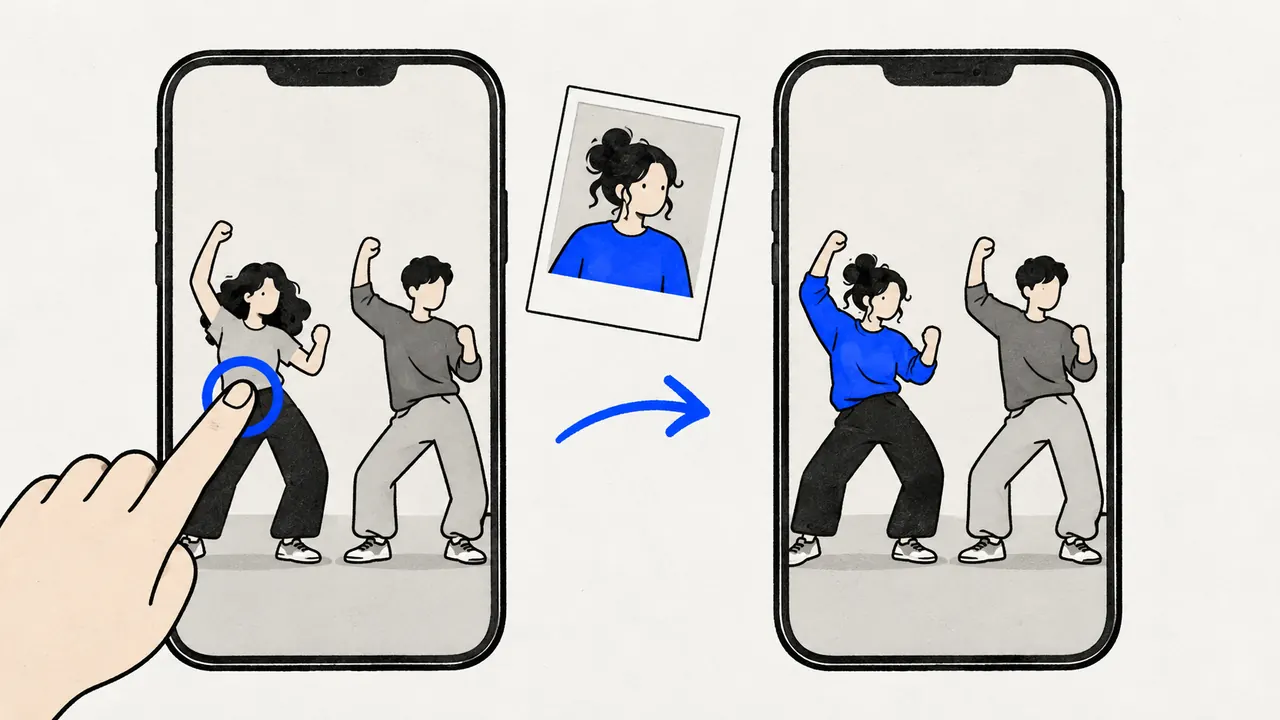
To put yourself in a video with AI, you need one clear photo of yourself and either a video to step into or a scene to describe. Capafy AI does both. Clone Cut puts you in the place of a person in a 2 to 30 s video, one you filmed or one of 18 trending videos, and keeps the moves, the cuts and the sound: 168 credits for 10 s at 480p on Wan 3.0. Image to video starts a new video from your photo and a prompt, from 17 credits. Both run in the browser, and the price is on the button before you create.
Updated
All guidesVideo to clone
Your photo
A clear photo of you, face to the camera. Putting in more people? Add one photo each, up to 9.
Settings
- Clothes
- Sound
Default · Re-shoots the scene
Clone Cut AI in action
Wan 3.0
Same moves, a new person
Trending videos for Clone Cut AI
Tap a video to use it in Clone Cut AI, then add your photo.
They come from public posts; to have one removed, use the takedown page.
Two ways to put yourself in a video with AI
Take the first way when the video already exists: a dance, a skit, a trend, a clip of your friends. Take the second when the scene does not exist yet: a music video on a rooftop, a night walk through Tokyo, a postcard from a beach.
| Into a video that exists | Into a new scene | |
|---|---|---|
| Studio tab | Clone Cut | Image to video |
| You add | A 2 to 30 s video and your photo | Your photo and a prompt of up to 2,000 characters |
| What stays | The moves, cuts, camera and sound of the video | Your face and look; the scene comes from the prompt |
| Length | As long as your video, 2 to 30 s | 2 to 30 s, by model |
| From | 84 credits (5 s, 480p) | 17 credits |
Put yourself into a video that already exists
The new video keeps every step, gesture and cut, so a dance stays on the beat and a skit keeps its timing. A 10 s video at 480p on Wan 3.0 costs 168 credits; the Clone Cut AI page lists every model and its limits.
- 1
Open Capafy AI: the studio starts on Clone Cut. Upload a video you filmed (MP4 or MOV, 2 to 30 s, up to 50 MB) or tap one of the trending videos under the studio.
- 2
Sign in with Google. The studio watches the video once and lists the people in it, for free.
- 3
Add a photo of yourself. With friends, add one photo each, up to 9.
- 4
Check who becomes you: the main person in the video is picked for you, and a tap on another face changes it.
- 5
Under Settings, wear your own clothes ("From the photo") or the outfit in the video ("Keep the video’s"), and keep the original sound. Then create.
Put yourself in a new scene from one photo
The photo carries you and the prompt carries the scene, so name a kind of place and a time of day. How to turn a photo into a video with AI covers prompts in more depth.
- 1
Switch the studio to Image to video and add your photo.
- 2
Write what happens with you in it: where you are, what you do, how the camera moves and what we hear.
- 3
Pick the model. On Seedance 2.5, Seedance 2.0 and Wan 3.0, your photo is a reference: you appear in the scene the prompt describes, and friends or pets from other photos can join you (up to 9 photos). On the other models your photo is the first frame, so the video starts exactly from it.
- 4
Set the length (2 to 30 s, depending on the model) and the resolution, check the price on the button, and create.
Music video The person in the photo sings to the camera on a city rooftop at sunset, wind in their hair. Slow push-in, warm light, an upbeat pop song with drums.
Travel The person in the photo walks through a night market in Tokyo, looks back and smiles. Handheld camera following from behind, neon signs, street sounds.
Film-style scene The person in the photo waits on a train platform in the rain, then turns as the train arrives. Wide shot, then a close-up, cold blue light, rain and a train horn.
The photo of yourself that works best
- Only you in the frame: crop friends out, or add them as photos of their own.
- Face toward the camera, eyes visible, no sunglasses or mask.
- Soft, even light. A window beside you beats a lamp right above you.
- No beauty filter or heavy edit: the model copies what it sees, smoothing included.
- Your whole body if the video shows the whole body; head and shoulders for a talking video or a close-up.
- A recent photo, with the hair and look you want to see in the video.
Put yourself in a music video, a trend or a movie scene
- A music video: film a friend lip-syncing or pick a trending dance, and Clone Cut keeps the original sound. Or describe the music video in a prompt on a model that makes sound (Seedance 2.5, Seedance 2.0, Kling 3.0, Wan 3.0 and MiniMax H3).
- A TikTok trend: the 18 trending videos under the studio are ready to use; tap one and it loads as your video.
- A movie scene: film and TV clips belong to their studios, so do not upload them. Describe a scene in the style you like ("a rainy train platform at night") and put yourself in it with image to video.
- A video with friends: add one photo per person in Clone Cut, or use group photo to video for a new scene with several people.
What it costs to put yourself in a video
Finding the people in a video is free. There are no free credits: packs start at $14.99 for 100 credits, with no subscription, and a video that fails gives its credits back. Is Capafy AI free? has the details.
| Request | Credits |
|---|---|
| Clone Cut, 5 s, 480p, Wan 3.0 | 84 |
| Clone Cut, 10 s, 480p, Wan 3.0 | 168 |
| Clone Cut, 10 s, 720p, Wan 3.0 | 336 |
| Image to video, 5 s, 480p, Seedance 2.5 | 147 |
| Cheapest video request | 17 |
Whose face can you put in a video?
Your own, and the faces of friends who said yes. Not children, and not public figures. Only use a video you filmed, licensed or were allowed to use; the trending videos here come from public posts and can be removed through the takedown page. Where a platform asks you to label AI-made videos, label them.
Try Capafy AI with one photo
Open the studioFAQ
Questions and answers
Can AI put me in a video for free?
Finding the people in your video is free, 20 scans a day. Making the video costs credits, shown on the button first: from 84 credits in Clone Cut and 17 in image to video. Failed videos are refunded.
How do I put my face in a video with AI?
Use Clone Cut with a photo of yourself. It puts you in place of the person, face included. Choose "Keep the video’s" clothes and your face, hair and build change while the outfit stays.
Can I put myself in a video on my phone?
Yes. Capafy AI runs in a phone browser, with no app or APK: upload the clip from your camera roll, add a selfie and sign in with Google.
Can I put myself in a video with someone else?
Yes. In Clone Cut the people you do not tap stay as they are, so you can join a friend in their video. To replace several people, add one photo each, up to 9, with their consent.
How long does it take to put yourself in a video?
Finding the people takes under a minute. A Clone Cut video takes about 5 to 6 minutes and image to video about 4 to 6, depending on the model. You can close the tab: the video waits in My videos.